.jpg)
Product Design
Mothered
Product
Mothered
A nutrition management system for pregnant mothers. It takes care of her nutritional needs based on how she feels each day, and not a fixed plan. Instead of goal-oriented pressure, Mothered offers a stronger support system to help her prep, record, and learn about pregnancy nutrition in an encouraging way. And unlike other apps, it takes the cognitive load off her plate, especially on days like a nausea flare, when she cannot fully show up for herself.
Details
- Mobile app for iOS and Android
- surface
- Product designer, built end to end
- role
- Solo passion project
- team
- Product design · Visual design · AI workflows · UX/UI · Prototyping
- scope
Problem
Built for the baby, not the mother's needs
Pregnancy apps already do a lot well. They help her self monitor, track fetal development and appointments, follow weekly guidance, and connect with peer communities. But most of them are built around the baby, not the mother, and her own needs, especially her nutrition, often get treated as an afterthought. On top of that, the tools meant to help with nutrition ask the most of her exactly when she has the least to give, expecting her to weigh, count, and log every bite even on a day she can barely get through. For a body and mind that are changing week to week, that is simply too much to ask.
Solution
Speak, snap, or add support circle
Mothered puts the mother at the center. She takes care of the baby, and Mothered takes care of her. Instead of manual tracking, she can snap a photo or just describe what she ate out loud, and the app quietly handles the rest. Instead of a fixed plan, it adapts to how she is actually feeling that day, easing back when she is not well and opening back up when she is. Instead of asking her to carry it all alone, she can bring a partner or loved one into her support circle. And instead of goal oriented pressure, every piece of guidance is offered in plain language and an encouraging tone, so caring for her own nutrition finally feels like something done with her, not something demanded of her.
Goals
I wanted mothers to close the app feeling looked after, not graded with streaks. Specifically focusing on pregnant mother's nutritional support, I wanted to see if a product that sits next to medical care could feel less clinical and more like a mother looking after her, the same way she's nurturing her baby. My main goal was to reduce her mental load, and when energy is low, eating well during pregnancy should feel possible, not like failing the baby.
Process + Key Insights
- Logging itself can be the harm. Turning a handful of crackers into a macro form can formalize an anxiety she already felt. I replaced the form with a photo or her own voice, treating that friction as a UX bug, not a moral weight.
- Real questions happen on reddit at 2am. Is this safe to eat, is this symptom normal, rarely gets asked in a fifteen-minute appointment. So the camera doubles as a safety check and the AI chat stands in for that 2am search, both responding based on ACOG, FDA, CDC, and NHS, instead of a stranger's guess online.
Reflections + Takeaways
For a vulnerable group, trustworthiness is the product, not a disclaimer to add at the end. That's where the actual philosophy of the app lives, beyond a screen. Pregnant users are already making safety decisions for two people, and they are being asked to share prescriptions, labs, and meals. I learned to design trust as a sequence of limits, keeping guidance educational and cited, never presenting an “AI doctor”, and letting a companion help without surveillance to support instead of it being another risk for them. Something I would take to the next health-adjacent product is to earn the right to personalize, and know when to stop.
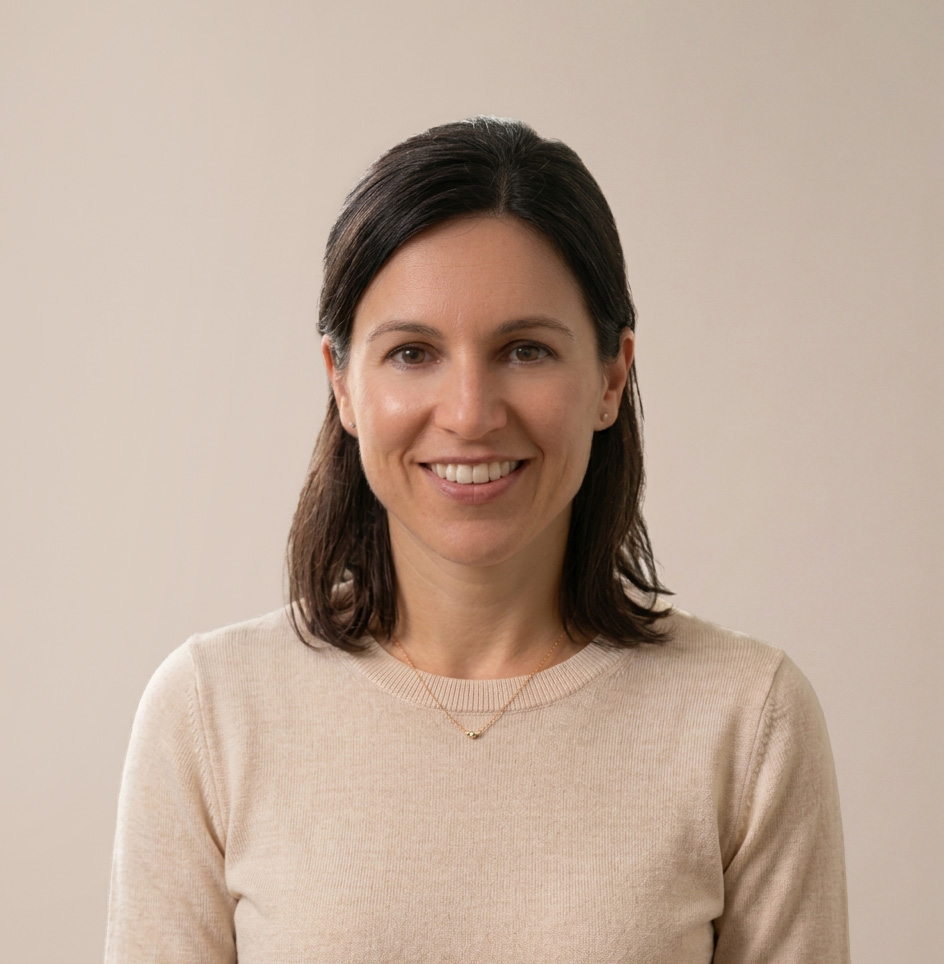
Amanda Gordon
31 years old · 22 weeks pregnant · Marketing manager
“I know eating is important, but on the days I can barely keep water down, opening another tracker feels impossible.”
Amanda is pregnant with her first child and juggling fast paced work and appointments. She often has morning sickness and is getting conflicting advice from the internet, friends, and family. She wants to take care of herself without turning every meal into a test.
Goals
- Feel supported on low-energy and nausea days, not scored
- Log meals without weighing, counting, or filling out forms
- Trust guidance that sits next to medical care, not over it
Frustrations
- Long forms and manual logging add mental load very often
- Conflicting online advice makes every bite feel like a safety decision
.jpg)
Welcome & onboarding
When Amanda creates an account, she registers as a mom. Then she's asked to upload documents she may already have on hand: a pregnancy chart, allergy test results, prescriptions, blood work, or anything else she feels comfortable sharing. This helps personalize her journey from the start.
Instead of typing everything from scratch, she can hand Mothered the records she already trusts, so the profile is both easier to complete and more accurate.
.jpg)
Creating a profile
Amanda uploads her documents, and the app scans them to fill in her profile automatically. From there, she lands on the review screens, where she can check what was detected and add anything missing.
Only three things are required: her name, how many babies she's carrying, and her due date, all of which the app already pulled from her files in step 1. Step 2 covers food allergies (also auto-filled from her documents) plus any dietary preferences. Step 3 asks about health conditions and activity level.
Across the whole onboarding flow, Amanda only has to actively answer three questions, each just a tap on a listed option.
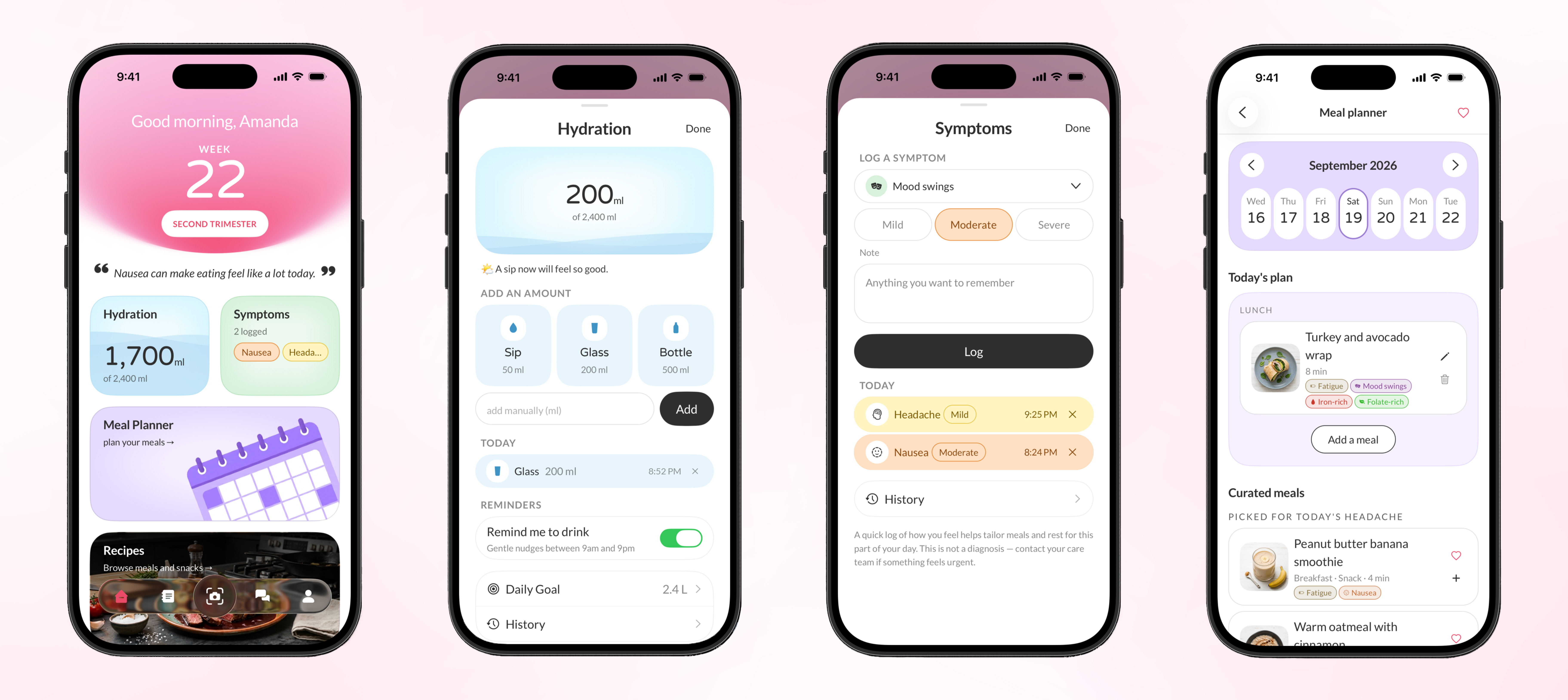
Dashboard
This takes Amanda straight to her dashboard, which greets her with a message that adapts to how she's feeling currently. The first feature she sees is hydration tracking, where she can log her water intake, turn on gentle reminders throughout the day, and set her own daily goal. Right next to it is symptom logging, where she can record what she's experiencing and how severe it feels. Below that is the meal planner, where she can plan meals ahead on her calendar and pull from curated suggestions based on what she's been logging, like meals picked for her headache or nausea currently.
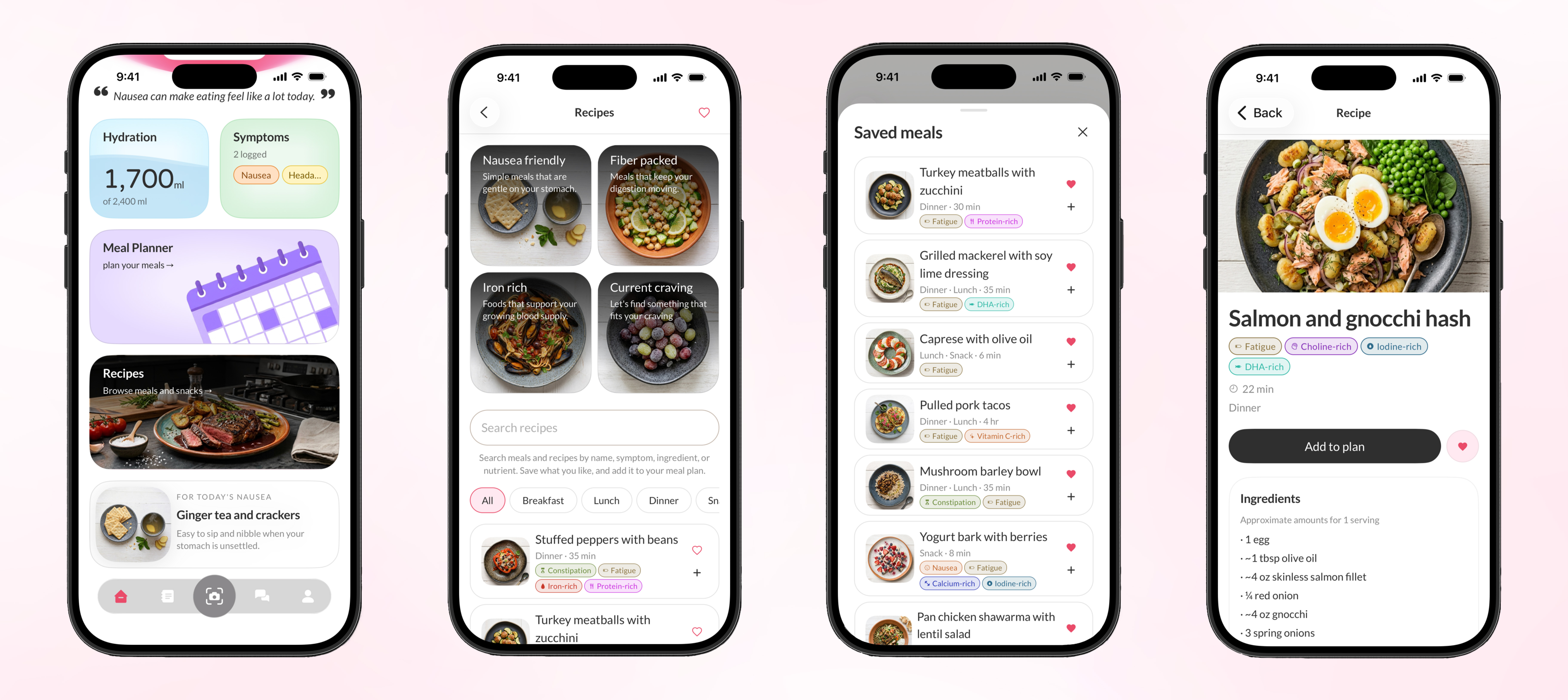
Meal suggestions & recipes
Below that sits a recipes tab, along with a food suggestion pulled specifically for how she's feeling currently, something easy to reach for when her stomach is unsettled. Amanda taps into the recipes page and finds meals organized into four categories based on different needs, nausea friendly, fiber packed, iron rich, or whatever she happens to be craving. Scrolling further, she browses other meals and starts saving the ones she likes, which she can later add to her meal planner or log. Each meal card opens into a full recipe page, showing its ingredients, instructions, and the nutritional benefits it offers.
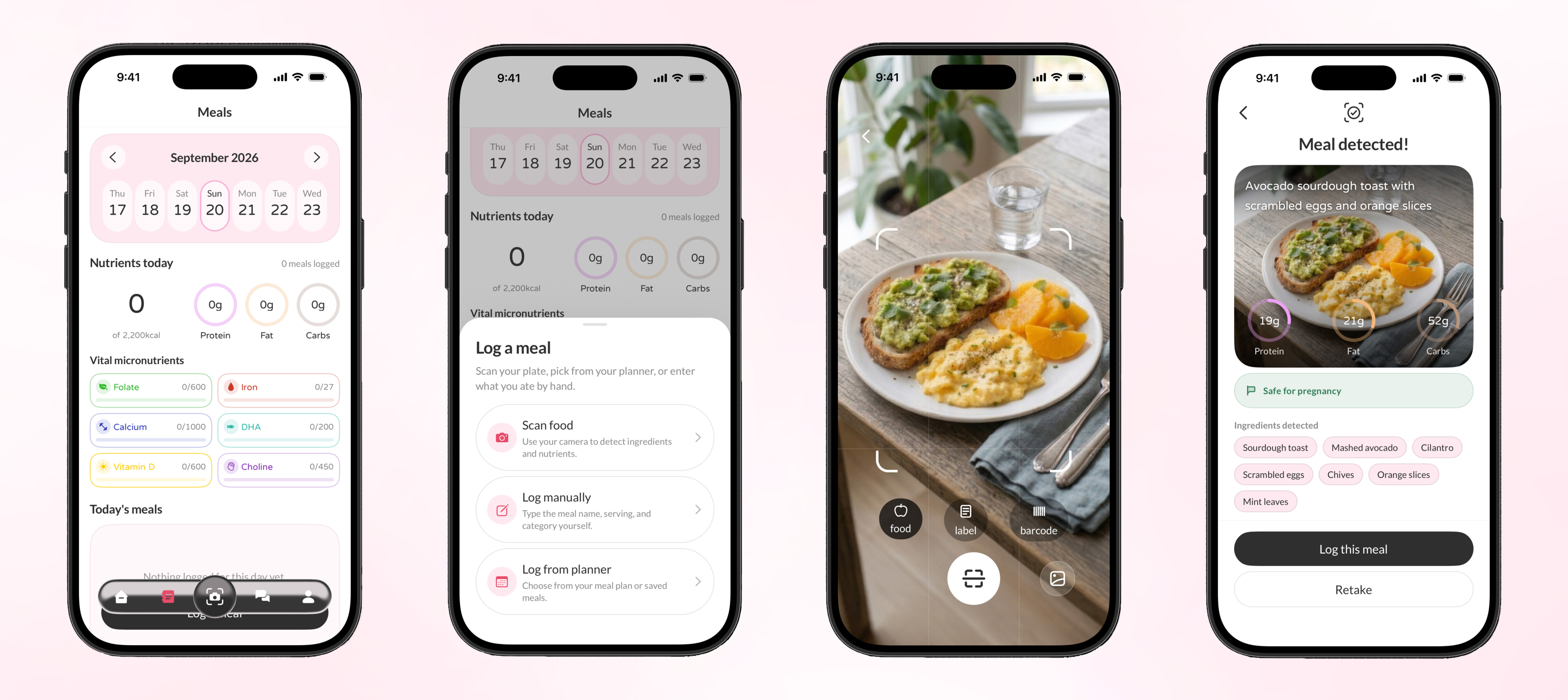
Meal logging
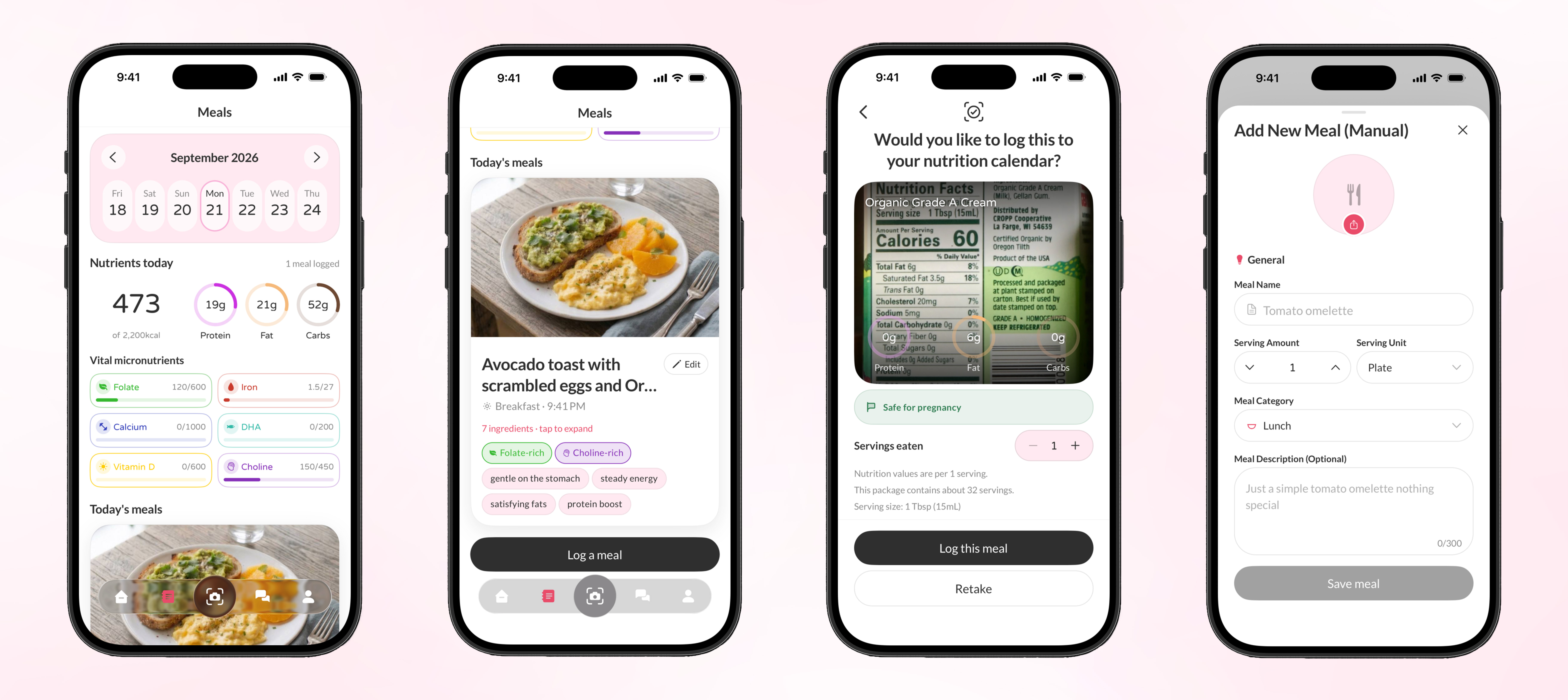
Amanda taps the second icon in the nav bar, which brings up her meals calendar for the day. To log a meal, she taps "log a meal" and is given three options: scan food, log manually, or log from her planner. She chooses to scan her plate, which can also be done by simply tapping the camera button in the middle of the nav bar. The app detects her meal and calculates its nutrients automatically. Most importantly, it also tells her whether the meal is safe for pregnancy.
Meal logged
Once Amanda logs the meal, her nutrition calendar updates to show the macros and micronutrients it added toward her daily totals. Scrolling down, she sees the meal card itself, tagged with simple descriptors like "gentle on the stomach" and "steady energy" so she can tell at a glance how the meal supports her. Tapping into it expands the full ingredient and nutrition breakdown. From there, she also explores scanning a product label with a 'label' feature and logging a meal manually, for when scanning isn't an option.
AI chat
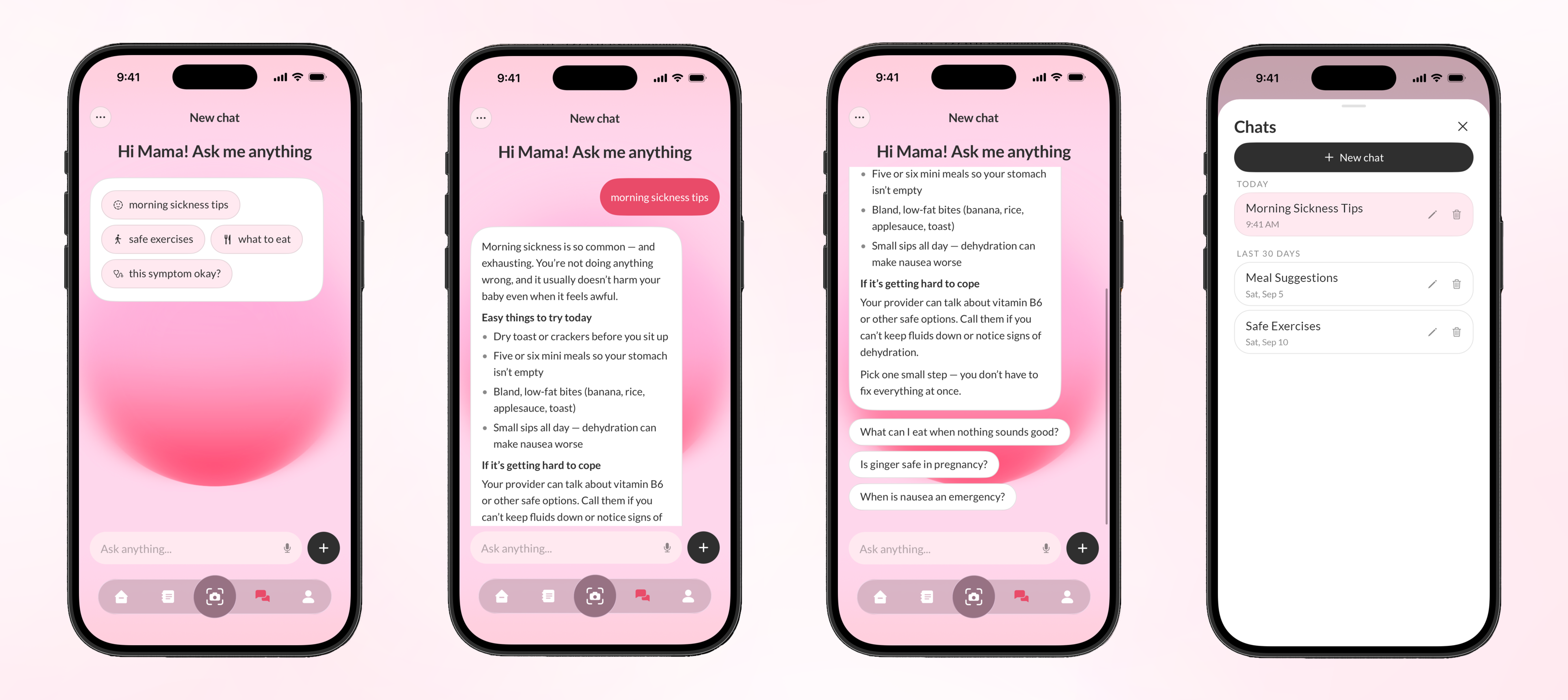
Amanda needs quick advice on her morning sickness with the AI chat feature. She finds it's already one of the default prompts in the chat. She taps "morning sickness tips," and the chat responds with thorough, reassuring advice grounded in credible sources like ACOG, FDA, CDC, and NHS. Below it, follow up questions appear, things like what to eat when nothing sounds good, or when nausea becomes an emergency, so she can keep digging without having to think of what to ask next. She can also open her chat history to jump between past conversations or start a new one for a different topic altogether.
Support circle
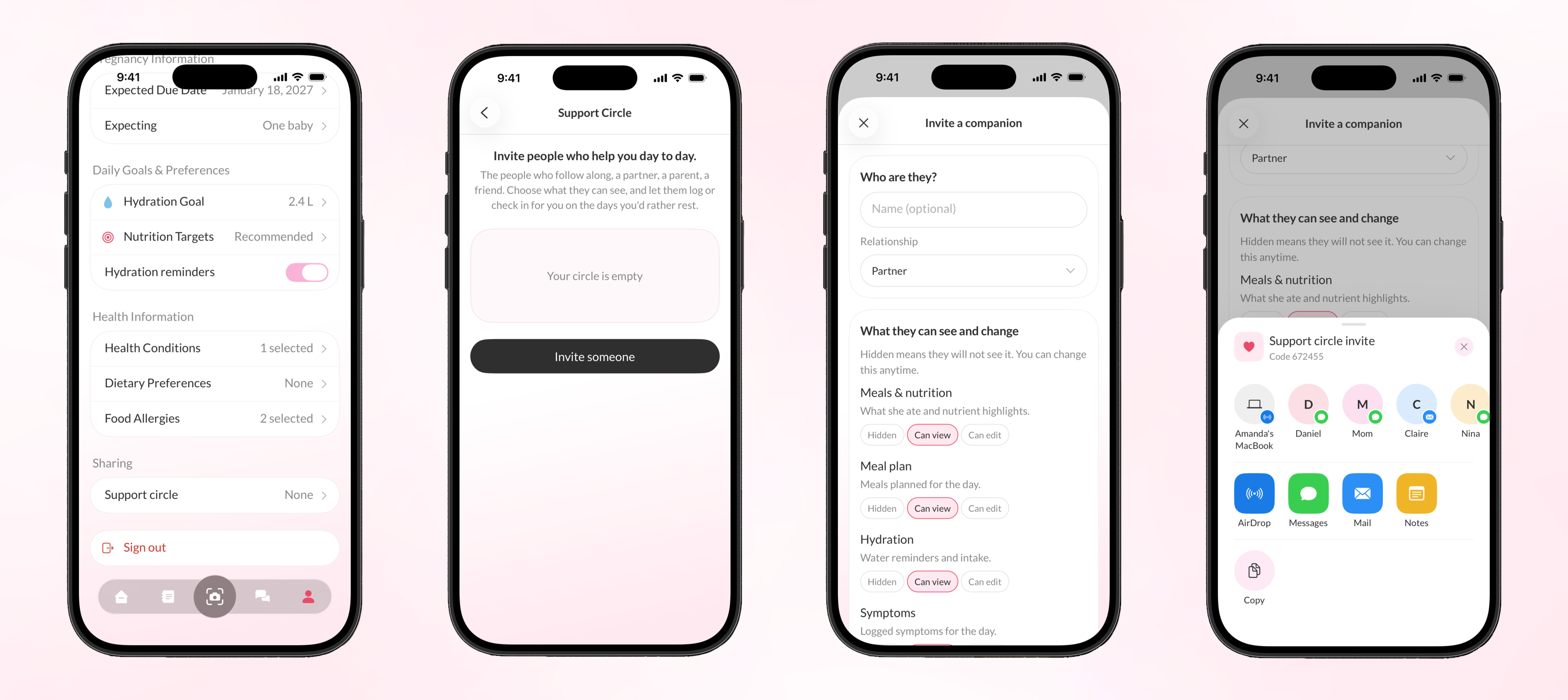
From her profile, Amanda can find the support circle feature, which lets her invite people into the app with specific levels of access. She taps into support circle and chooses to invite someone, starting with their name and relationship to her, in this case, her husband Nick, marked as her partner. From there, she decides exactly what Nick can see and do across each part of the app, meals and nutrition, her meal plan, hydration, and symptoms, choosing between hidden, can view, or can edit for each one.
Once she sets his permissions, Amanda gets a 6-digit invite code to share with Nick. With that code, Nick can log in as a companion mode and step in on her harder days, logging meals for her, checking her water intake and symptoms, or looking at her meal plan to grocery shop and cook accordingly, all within the boundaries Amanda set for him.